In this guide
Agora is a starting point. Learn to identify the office, application, and evidence that actually finish a student task.
Begin with a result you can recognize
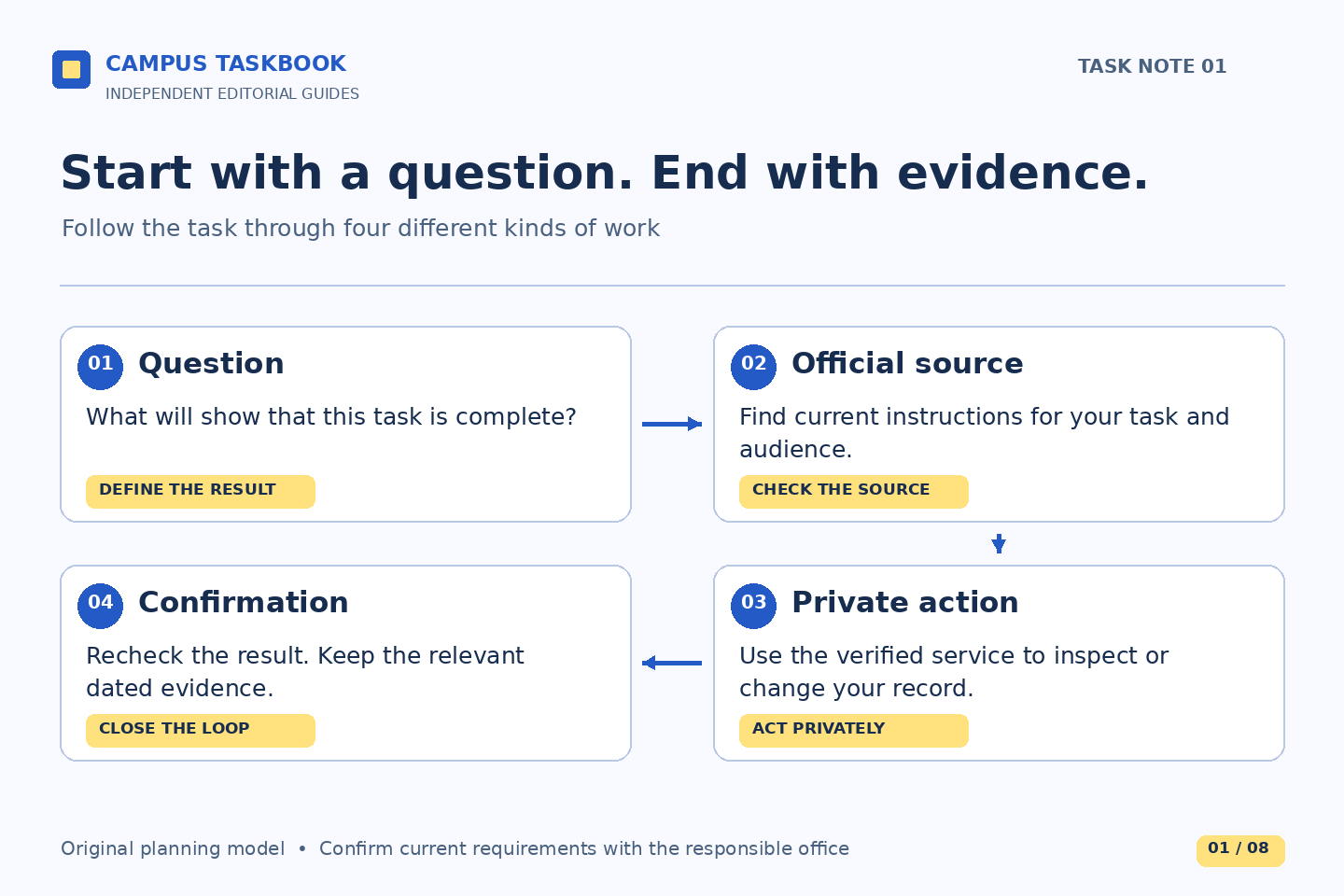
A useful campus question begins with an outcome: confirm the current course schedule, understand a charge, locate an assigned advisor, or find the status of a submitted document. “Get into Agora” describes an access step, but it does not say what would make the work complete. Before opening another tab, finish this sentence in a private note: “I will be done when I can verify…” That small change makes a confusing cluster of links easier to navigate.
Boston College’s ITS page describes Agora Portal as a central access point for BC services. Read that as a map of entrances, rather than a promise that every answer is on the portal landing page. Campus Taskbook is an independent publication, not a BC office or support service. We do not provide an alternative sign-in, inspect student accounts, or determine the status of a student’s records.
Separate the entrance, workspace, and record
Our practical model has three layers. The entrance helps you reach a service. The workspace lets you inspect information or perform an action. The record is the evidence you need to evaluate afterward. These layers may appear close together on screen, but they answer different questions: Where do I go? What am I doing? What now shows that the task is finished? This model is an editorial organizing method, not BC’s official system architecture.
BC’s undergraduate registration guidance identifies EagleApps as the registration system. Its billing guidance identifies My Bill as the electronic billing and payment system. Those names are useful landmarks because they make a request precise. “I can enter Agora but cannot view the relevant billing activity” contains more diagnostic information than “my portal is broken.” A successful entry into one service does not establish that an unrelated record has changed.
Use a task card instead of a link collection
Make one short private task card for each unfinished outcome. Give it six fields: desired result, relevant student group or term, official guidance page, service name, last observed state, and next question. Put the observation date beside the state. A link collection without these fields can become a museum of pages you once opened. A task card preserves why a page matters and what remains unresolved.
Illustrative example: a student preparing for advising writes, “Result: discuss a possible mismatch in my academic record. Period: current planning term. Source: undergraduate registration guidance. Service: degree audit. Observation: a completed course appears in a different category than expected. Question: is the record wrong, or does the requirement need interpretation?” Nothing in that example establishes a real error or grants an exception. It simply prevents the student from treating a guess as a confirmed administrative fact.
Keep account identifiers, credentials, and detailed personal records out of shared planning documents. A task card can use a neutral label such as “course-category question” and point you back to the official private record when you need details.
Read instructions for the right audience
A page can be official and still be the wrong page for your situation. Check the audience before following a procedure: current or prospective student, undergraduate or graduate, school, semester, and academic year. BC’s Student Checklists page separates several student groups. Its aid guidance also distinguishes prospective-student and current-student routes. Those distinctions are a reason to stop and identify your context, not to borrow whichever instructions look simplest.
For example, an applicant reviewing an admission-related award should not infer that a current student’s Agora route applies to them. Similarly, a page describing registration should not be treated as a substitute for instructions inside a teaching platform. Use the official office’s page to establish the relevant service, then follow the current guidance there. Avoid recreating a procedure from an old screenshot, an archived student handbook, and a classmate’s memory.
If two official pages appear inconsistent, preserve their titles and the specific point of conflict. Ask the responsible office which instruction applies to your case. Do not resolve the disagreement by choosing the later-looking design.
Describe the boundary where progress stopped
When something fails, identify the last thing that worked. Did the official guidance page load? Did the portal open? Did the target service appear? Did the record load but show something unexpected? Did an action seem to finish without a corresponding status change? These are observations, not diagnoses. They help distinguish an access problem from a question about institutional data or procedure.
BC’s Agora FAQ says a grayed-out service is temporarily unavailable, possibly for maintenance. That does not tell you the cause or duration of a particular interruption. Record what you actually saw and when. If the problem concerns access, the ITS support page supplies current assistance channels. If access works and the question concerns the meaning of a bill or academic record, start with the office responsible for that subject.
Close the loop with fresh evidence
Working backward from the desired result helps you avoid a false finish. If the result is “know my schedule,” opening registration guidance is preparation; reading the relevant current schedule is the verification step. If the result is “understand a charge,” reaching My Bill is preparation; identifying the dated entry and obtaining any necessary explanation is the substantive work. A receipt, a status label, and a final decision are different kinds of evidence.
At the end, update the task card in one sentence: verified, waiting for clarification, or unable to check. Include the date and the next responsible party if one is known. The public sources checked on October 1, 2026 establish service descriptions and published routes. They cannot establish your access rights, current balance, registration outcome, or completion status. Return to the live official source before taking a consequential action.
Read next: Choose a help channel by the question you need answered, or When a course task belongs in Canvas.